Mounting Orbit Velo on your bike
Tip: pair Orbit Velo with Find My before you mount it, and test Play Sound.
Always mount Orbit Velo with the button side facing the frame. This applies to Orbit Velo and Orbit Velo Duo.
Why the button faces the frame (anti-theft): once mounted, nobody can press the button. A thief can't switch off, disable or reset your Orbit Velo to stop it being tracked.
Option 1: bottle-cage holes (best) Most bikes have two threaded holes on the frame for a bottle cage.
- Line up Orbit Velo with the two holes, button side against the frame.
- Fix it with the security bolts using the included tool. Tighten evenly; don't overtighten.
- Want your bottle cage back on? Put the cage on top of Orbit Velo and use the longer bolts. The cage also hides the tracker.


Which side is the button? The flat side with the printed label. That side goes against the frame.
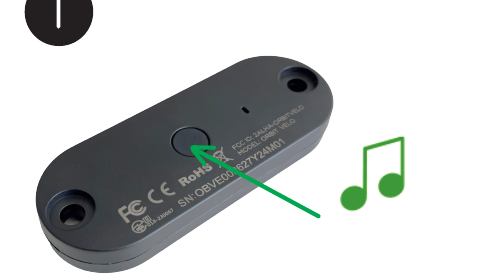
Prefer it without a bottle cage? Orbit Velo can be bolted on its own, button side against the frame:

Option 2: no bottle-cage holes Use the included zip ties and/or double-sided tape on a clean, dry, hidden surface, for example under the seat. Keep the button side facing the bike. Keep it clear of steering, cables and moving parts.

Need to disable, reset or switch networks? Unscrew Orbit Velo from the bike first so you can reach the button, then follow the button guide.
Lost the security key? Orbit Velo's security bolts use a Torx T25 tamper-proof (security) key: a T25 star with a hole in the tip for the pin in the bolt. A tamper-proof key also fits plain T25 bolts, so it's the safe choice. We don't sell the key separately, but any T25 tamper-proof key or bit works, for example on Amazon:
- US: Eklind 15725 T25 tamper-resistant L-key · VEGA T25 security bits, 4-pack (needs a 1/4" bit holder or screwdriver)
- Germany/EU: Wera 367/6 TORX BO screwdriver set (includes TX 25)
When buying, look for "T25 security", "tamper-proof", "TR25" or "TX 25 BO". These are independent sellers' listings, not Orbit products.